PHribbon & Carbon Calculator

Smarter tools for PHPP users

What it does

AECB PHribbon extends PHPP beyond energy performance, the sections below cover these three parts:
Whole Life Carbon and there is a training course available to learn about this feature in depth.
Build PHPP – enables you to build libraries of U-values, has its own library of Lambda values, windows and more.
Optional modules  – for Retrofit Costs and Daylight Factor


Whole Life Carbon

  • Works out quantities from PHPP using the U-value and Area tabs, and you can also use the extra large U-value calcs. PHribbon v6.08 onwards can also correct those external areas so that volume of materials is accurate for the layer.
  • Built-in library of almost 1000 entries, mainly from EPDs, containing the Whole Life info for stages A-D including sequestration for timber/natural materials.
  • 60 year Reference Study Period (which can be changed to 50 for Ireland).
  • Matches materials automatically and allows you to adjust the choice where necessary.
  • Remembers materials so that when you select them again it remembers the EPD you chose last time.
  • Density of some materials can be adjusted, for example mineral fibre insulation if installed at a different density.
  • 100% FSC/PEFC certified wood is assumed (affects the sequestration calculation), or if it is not, you can give the % that is.

Examples of the input process, main menu and buttons 1, 2, 3 and 4:
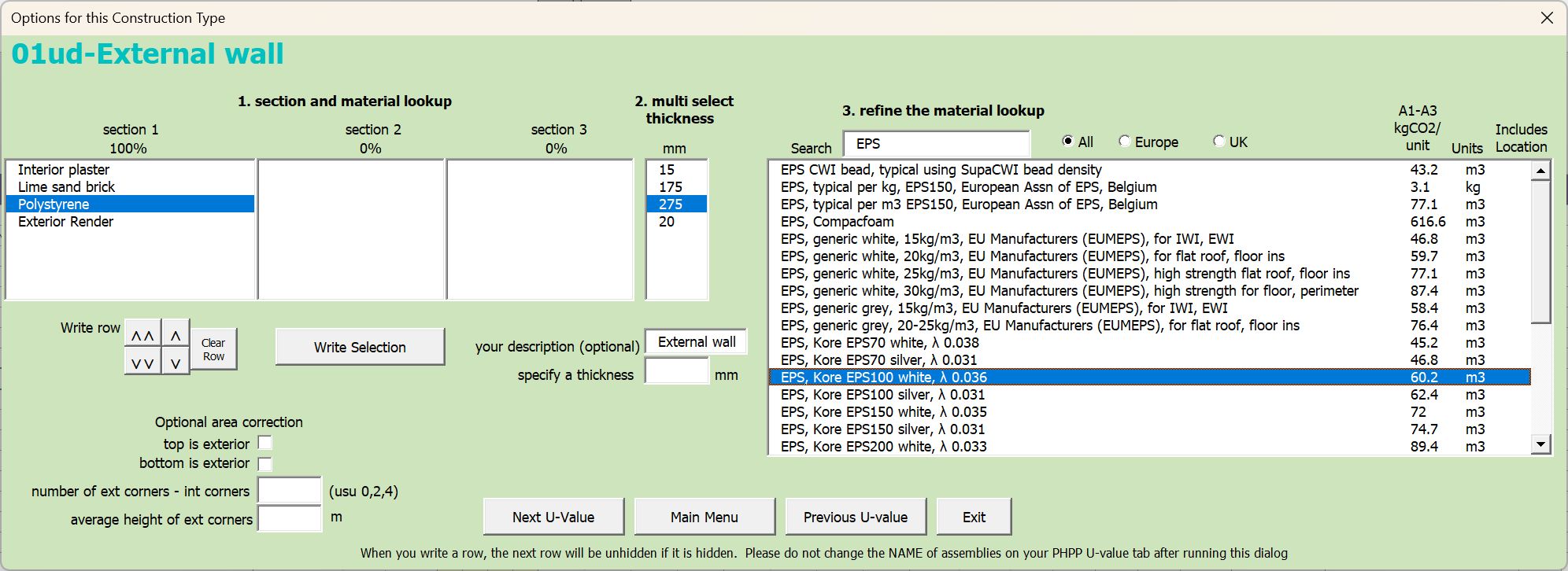
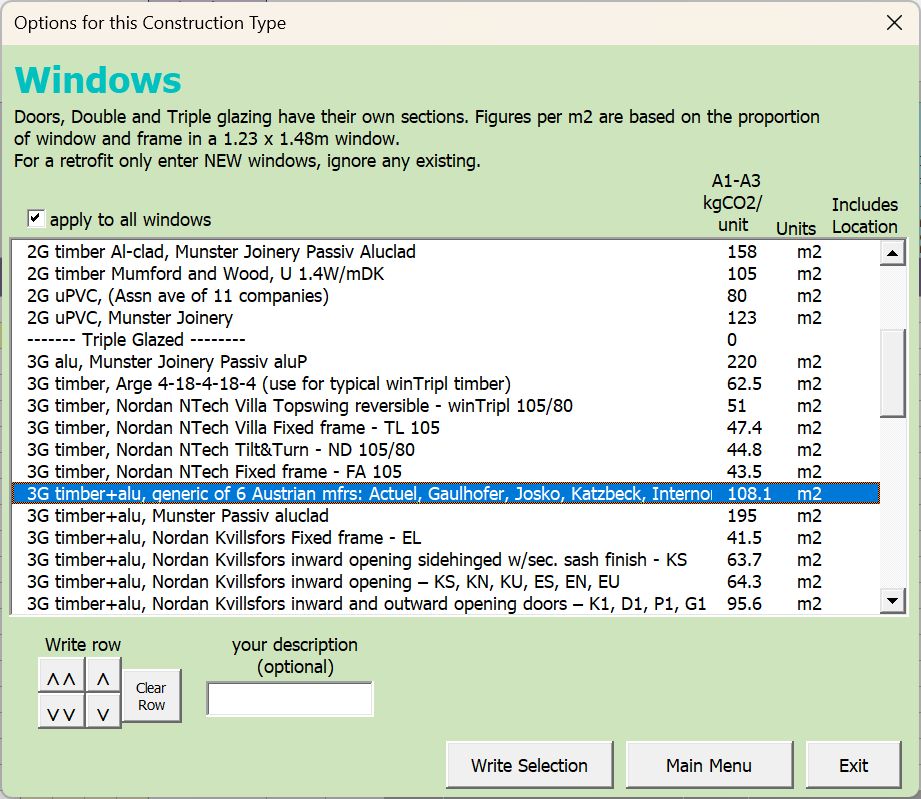
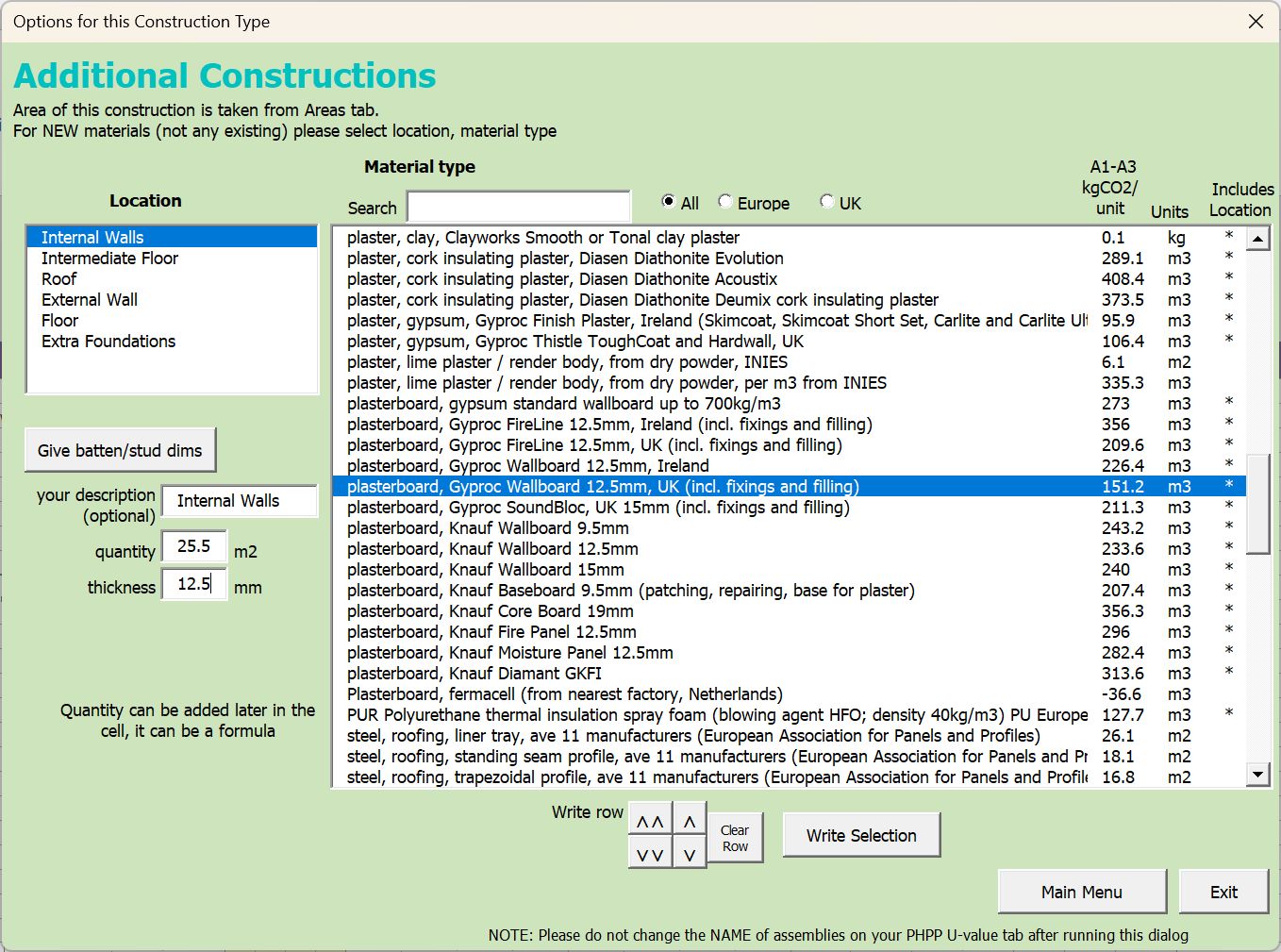
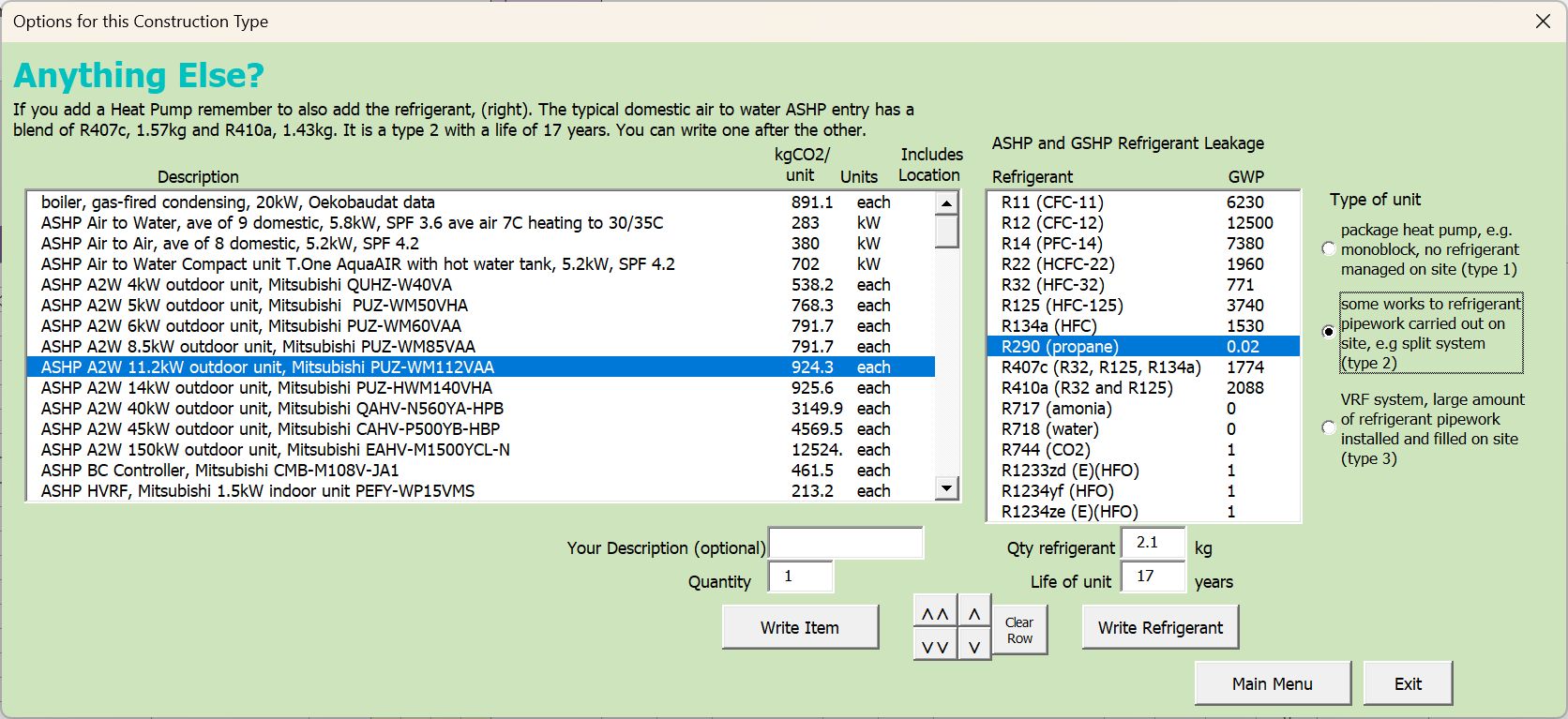
  • Up to 12 options can be graphed/compared.
  • Fully transparent calculation.
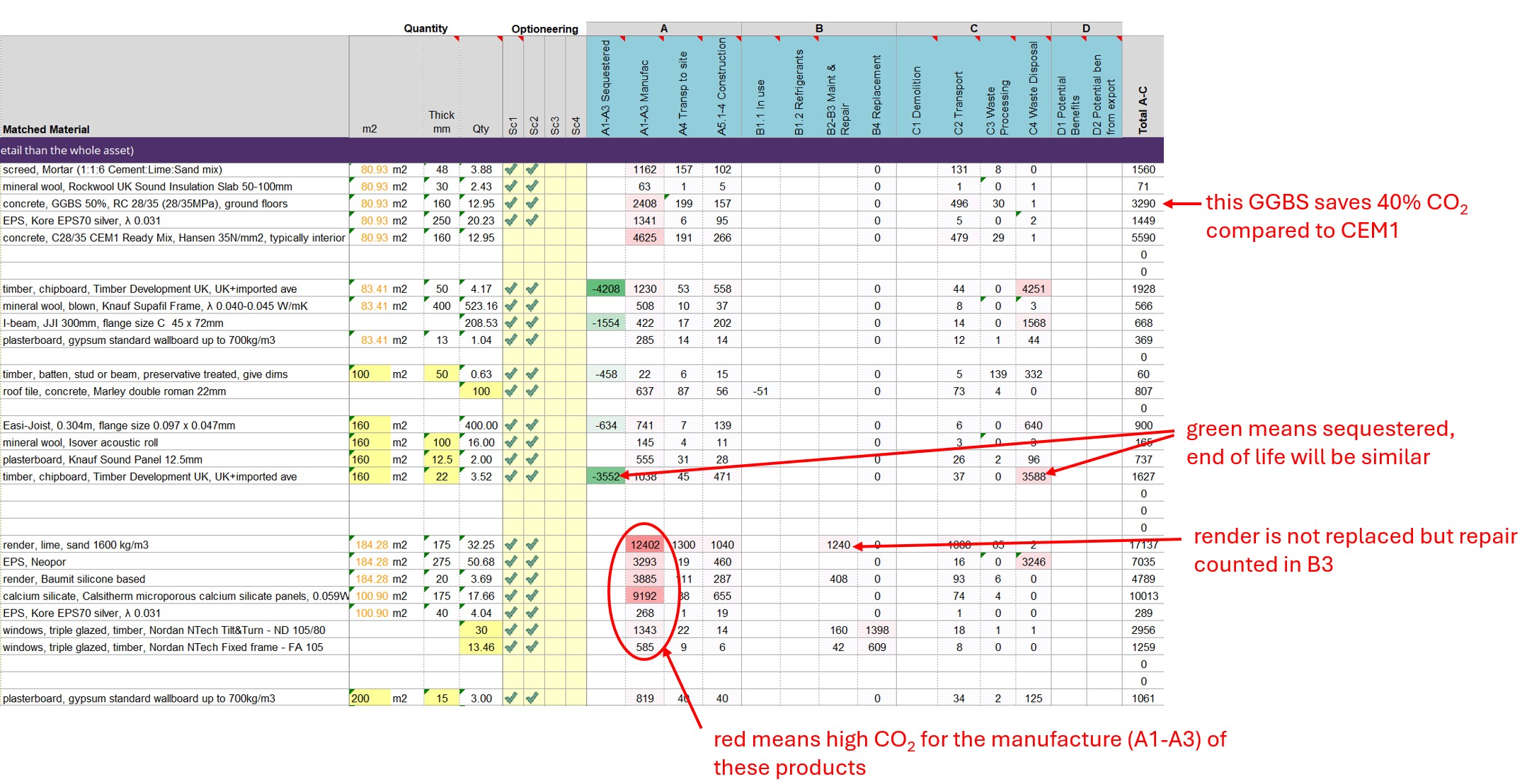
  • Coloured “heat map” results, the output table is coloured by value to make it easy to see where the CO2 is coming from.
  • Whole Life Carbon CO2 graph shows operational and embodied CO2.
  • EmbodR results tab gives RIBA 2030 Challenge, LETI, and an estimate of UKNZCBS laid out on printable pages.
  • WLCA uncertainty factor is set up for you to help you calculate it – this improves your result by reducing the percentage that has to be added.

Examples of the CO2 heatmap results:   

Build PHPP

  • Climate – Easier selection of climate region, shows what counties are in what region, you only need to know the county that the building is in.
  • Orientation – Gives a simple way to work out bearings of each wall, draws outline of building as a crosscheck (if you have entered wall lengths)
  • Check PHPP – Takes you to each part of your PHPP and questions values. You can stop and correct something straight away, list what needs attention and change what to check.
  • Windows – Enters different window styles quickly, in mm or m, calculates the d-reveal, and enters the other info.
  • D Reveal – Enters the d-reveal where there is cover.

Window Tool

Retrofit Costs & Managing Data

  • Simple, Variant and Step by Step Costs

    Estimating costs for a retrofit is complex. Costs change over time and also vary by region and by contractor. Accurate information must be obtained through quotes, however some uncertainty can be reduced by estimating some of the costs in advance. This can lead to much better estimates over time. PHribbon helps by
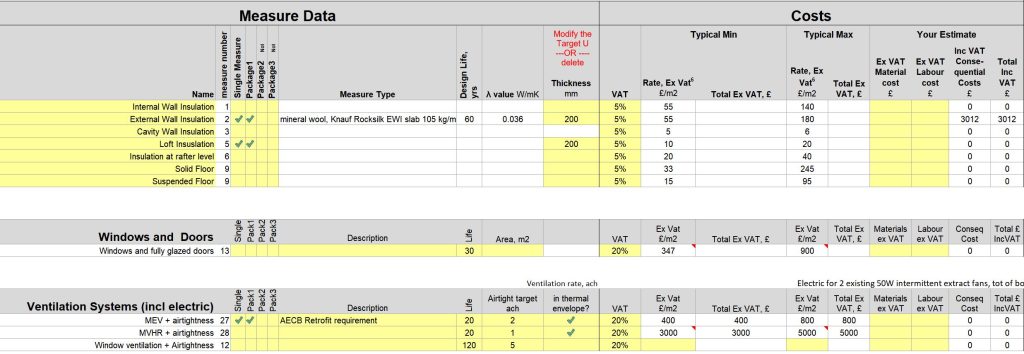
    • adding a new sheet (seen below) that lists the measures you have added and works out the cost
    • organizing the rates for retrofit costs into groups and giving initial figures (which may need to be updated). These can be edited on the PHribbon Retrofit Costs “RCosts” tab.
    • “Simple” generates the Net Present Value of a PHPP for a retrofitted building
    • “Variants” compares the Net Present Value of several options that have been modelled in PHPP using variants
    • “Step by Step” works out the Net Present Value of a sequence where each variant of the PHPP represents a step for the same building

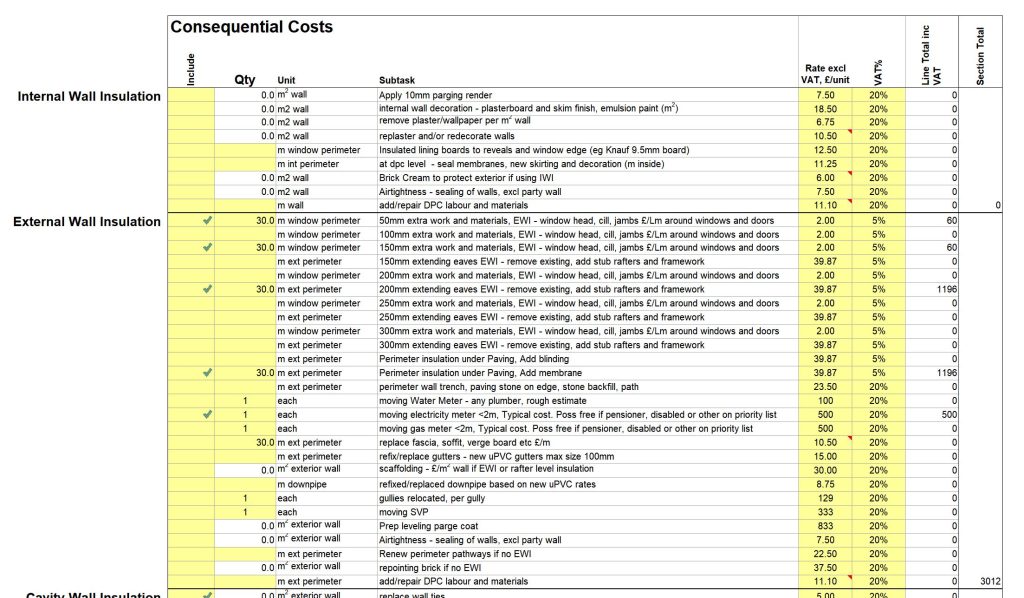
There is also an list for Consequential Costs – where specific circumstances could significantly increase the cost of a particular measure. This feeds back into the main table:
PHribbon exports into Mark Siddall’s Daylight Factor calculation sheet. An example of the output is given below. Mark gives training in his spreadsheet in this Daylight Factor Training Video .

RICSv2 diagram explaining Whole Life Carbon

PHribbon is written to align with the RICS 2nd Edition (2023) Professional Statement on Whole Life Carbon. This is based on EN 15978 and is required by RIBA, CIBSE and IStructE. It is suitable for the RIBA 2030 Challenge v2, LETI and has initial estimates for the UK Net Zero Carbon Building Standard (UKNZCBS). There are also some local authorities that require Embodied Carbon calculations, such as London (London Plan 2021), South Hams (Totnes).

PHribbon calculates Whole Life Carbon, which combines the embodied CO2 from materials with the operational CO2 from running the building.  It is cradle to grave, covering stages A-C (and most module D info) :

Module A, A1-A3 Manufacture including A4 Transport to site and A5 Construction including A5.1 Pre-construction demolition and A5.3 Construction waste.
Module B, Use of the building including B4 Replacement
Module C, End of Life of the building including RICS estimates where this info is missing
Module D1 where info is provided in the EPD (RICS est for missing info is not yet implemented) and Module D2 calculation of exports from PV or other renewables.

The AECB Carbon Calculator works in a similar way except that it doesn’t link to PHPP and only calculates Embodied Carbon. This also means that it can’t give full RIBA or LETI results, only the embodied part.


Minimum requirements:

  • Windows PC, or a Mac with a PC emulator (Parallels, VMware)
  • Microsoft Excel from a current version of office, or within last 5 years
  • Dropbox or Sharepoint for us to send you updates
  • PHPP version 10, though most of it will also work on older PHPP v9 files

Microsoft have had the facility to add custom buttons on a ribbon (toolbar) in Excel for some time. Tim Martel and the AECB have teamed up to create one for PHPP which speeds up common tasks and extends what PHPP can do. No special PHPP is needed. It is designed for PHPP v10 and most buttons (apart from windows and d-reveal) are also compatible with earlier versions of PHPP: 9.6, 9.3, 9.1 and 8.5. You can also use it with PHPPs created by designPH.


Watch this introduction to the AECB PHribbon software to see how it can assist with your calculations

Further information, Installation Guide and Licence Agreement

PHribbon is continually updated with new EPDs that replace old ones that expire, new Future Energy Scenarios from NESO and revised Government CO2 reporting data.   Your subscription allows us to keep it updated and you automatically receive updates and fixes as they are released.

The first year’s subscription is included in the purchase price.

PHribbon consists of three parts: Whole Life Carbon, Build PHPP, and an annual subscription fee to enable software developments and upgrades.

The total package price is £250 ex VAT for non members and this includes a £70 ex VAT purchase of an annual recurring subscription fee.  The subscription fee will be payable annually on the purchase anniversary.

The AECB members price is £200 ex VAT which includes a discounted subscription fee at £50 ex VAT also payable annually.

The price of the software includes a user guide.


Your payment confirmation email will ask for a security code which you get from a downloaded spreadsheet.  Pressing the button in that spreadsheet just reads a unique code on your computer, it makes no changes whatsoever.  If you change your computer in the future a new Licence Key will be sent to you free of charge.

Software will be distributed by Dropbox to enable updates to be sent to you automatically.  Once you have the software, copy it from the Dropbox to your own folder.  Enter the licence key at the top of the Install tab then follow the instructions below it.  You will also need to enable macros, there are instructions about how to do this safely in the User Guide. (Macros are already part of PHPP v9.6 variants version written by the Passivhaus Institute.)

For any questions please email Tim

By using this software you agree to these terms :

  • Users may not redistribute the PHribbon spreadsheet, or repackage it free of charge or otherwise.
  • The software has been rigorously tested and great care has been taken to ensure there are no errors, however not every situation in which PHPP can be used can be foreseen, therefore checks for costs are still recommended. Any mistakes found will be corrected free of charge and all users updated. The user is responsible for checking the figures, especially in circumstances where they are critical. In extreme circumstances the maximum compensation will be a refund of the price paid for the software. By using this software you agree that no legal claim can be made against the AECB nor Tim Martel.
  • Costs provided are indicative only and are the best information available to the author. By their very nature they are variable according to location, supplier and quantity. They serve only as a starting point and can be updated at any time either for one project (i.e. changing the figure in the costs tab in the PHPP) or by changing the master table for all future projects in the PHribbon spreadsheet.
Collaborate with other experts

Get insights from AECB members

Copyright © 2026 AECB – All Rights Reserved / JFC made this website